
🕵️♂️ OSINT Using AI Vision: Extracting Secrets From Screenshots 📸

Welcome back to The Hacker’s Log 🏴☠️ — today we’re diving into one of the most underrated OSINT techniques: using AI Vision to extract secrets from screenshots.
We all know traditional recon tools like Amass and Subfinder are 🔥, but what about all those screenshots developers and companies accidentally post online? They often contain URLs, API endpoints, internal UI elements, cloud info, secrets patterns, debug flags, and more — even if blurred. With AI Vision + OSINT, we turn screenshots into actionable intelligence.
This guide will teach you:
What AI Vision OSINT is 🤖
How to extract info using free tools
Real-world examples 💡
Practical workflows
Cheat sheets, playbooks, and learning resources from my digital store to help you scale faster 💰
Useful comparisons & visuals
Let’s dive in! 🏊♂️
📸 What is AI Vision OSINT and Why It Matters
Traditional OSINT is text-centric — scanning domains, DNS, metadata, source code, etc.
AI Vision OSINT is image-centric: extracting text + context from screenshots using AI.
Imagine seeing a screenshot of a dashboard…
…it might look harmless, but AI Vision can extract text, UI elements, backend hosts, region codes, API paths — all of which expand your attack surface.

This transforms normal images into recon assets.
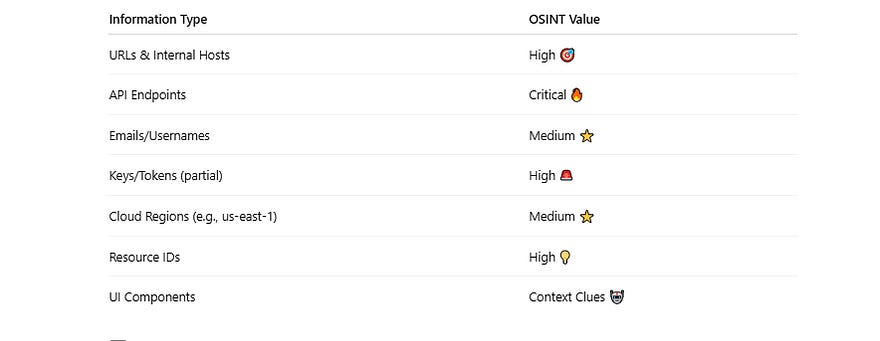
🧠 What Kind of Intelligence Exists in Screenshots?
Here’s what you can pull out of a single screenshot:
💡 Example: Screenshot Hack That Paid Off
A dev tweeted:
“Our new dashboard is live!”
Screenshot attached
AI OCR detected:
dashboard.internal-prod.company.com
Region: us-east-2
Service: Grafana
Bounty hunter followed up with:
Subdomain enumeration
Manual testing
Identified access control flaws
🎉 Result: $800 payout.
🛠 Tools for AI Vision OSINT
Here are the tools that make this possible:
👁️ 1. Tesseract OCR — Extract Text from Images
🔗 https://github.com/tesseract-ocr/tesseract
Most popular open-source OCR engine.
tesseract screenshot.png out.txtWorks great for:
URLs
Emails
API patterns
🔹 Pro tip: Run OCR on enlarged/cropped screenshots.
🧠 2. Google Vision API — Advanced Image Understanding
🔗 https://cloud.google.com/vision
Beyond OCR:
Logo detection
Context tagging
UI pattern recognition
Great for automated pipelines.
🔎 3. OpenCV — Image Processing
🔗 https://github.com/opencv/opencv
Use for:
Detecting blurred areas
Segmenting UI regions
Identifying text groupings
🧠 4. AI + OCR Combo (Python Approach)
from PIL import Image
import pytesseract
img = Image.open(”screen.png”)
text = pytesseract.image_to_string(img)
print(text)Here’s how the pipeline works:
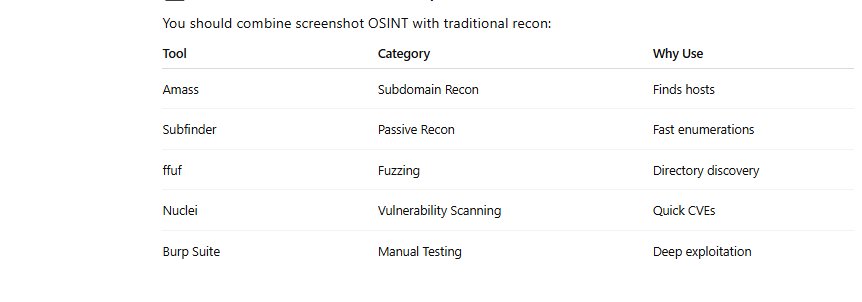
Screenshot → Image Preprocessing → OCR → AI Context Parsing → OSINT Insights🧰 Traditional Recon Tools (Complement AI Vision)
You should combine screenshot OSINT with traditional recon:
🛒 Recommended Products
If you’re serious about OSINT + bug bounty, these resources will help you level up much faster:
📂 Hidden Directories & Files Cheat Sheet
👉 https://thehackerslog.gumroad.com/l/hdfcheetsheet
When fuzzing without a good wordlist is like hacking blind — this cheat sheet gives you patterns that have historically led to bugs.
🔍 Recon Cheat Sheet (Targeted for Bug Bounty & OSINT)
👉 https://thehackerslog.gumroad.com/l/reconcheatsheet
Your recon game plan in one place:
Step-by-step process
Tool chaining workflows
Mistakes to avoid
Perfect for those starting out or trying to systemize OSINT.
🌐 Subdomain Takeover Playbook
👉 https://thehackerslog.gumroad.com/l/subdomain
Some of the highest paying bugs come from forgotten subdomains — this guide shows you exactly how to spot them.
🧰 Ultimate Bug Bounty Toolkit
👉 https://thehackerslog.gumroad.com/l/ultimatetoolkit
A compilation of must-have tooling and setups used by pros — including config snippets, automated pipelines, and tried-and-true defaults.
🔑 Hidden API Endpoints Guide
👉 https://thehackerslog.gumroad.com/l/hiddenapiendpoints
Screenshots often reveal API patterns — this guide teaches you how to mine them for bugs.
🤖 AI Prompts for Hackers & Recon
👉 https://thehackerslog.gumroad.com/l/aiprompts
AI isn’t just for OCR — use smart prompts to:
Generate payloads
Interpret screenshot text
Explain output
Draft reports
🧠 Best AI Tools for Hackers & Security Pros
👉 https://thehackerslog.gumroad.com/l/BestAITools
A curated list of AI tools that actually help in recon and OSINT — no fluff.
📘 Hacker’s Recon Guide (Beginner → Pro)
👉 https://thehackerslog.gumroad.com/l/hackersreconguide
If OSINT feels overwhelming, this is your roadmap from zero to OSINT mastery.
💻 Mastering C++ for Hackers & Engineers
👉 https://thehackerslog.gumroad.com/l/masteringcpp
Going deeper into exploits often requires low-level knowledge — this guide helps cement that foundation.
🧠 Putting It All Together — A Screenshot OSINT Case Study
🔎 Step 1:
Crawled Twitter/X for screenshot mentions of release notes.
🔎 Step 2:
Ran OCR → extracted URL patterns like:
portal.internal.company.com/api/v2/stats🔎 Step 3:
Added domain to recon tools
amass enum -d internal.company.com🔎 Step 4:
Used ffuf to fuzz APIs
ffuf -u https://portal.internal.company.com/api/FUZZ \
     -w ~/wordlists/api.txt
🔎 Step 5:
Found a parameter userId without auth → confirmed IDOR.
🎉 Result: $900 bounty
💡 Practical Tips For OSINT With AI Vision
✅ Always download the original, highest resolution screenshot
✅ Preprocess images — crop & zoom before OCR
✅ Test multiple OCR engines — results vary
✅ Use patterns from screenshots to expand fuzzing
✅ Combine with recon tools to validate findings
✅ Don’t stop at text — look for UI context
🧠 Final Thoughts
Screenshots might feel harmless, but hackers have long known they contain context-rich leaks. With AI Vision paired with traditional OSINT techniques, you unlock a treasure trove of actionable data.
The recon ninja doesn’t just scan hosts — they see the unseen 👁️.
Harness AI Vision. Extract value. Make better reports. Earn more bounties.
📢 Call to Action
📘 Follow my Substack for weekly hacking & OSINT guides:
👉

🛒 Explore all my bug bounty tools, cheat sheets, and OSINT resources:
👉
https://thehackerslog.gumroad.com/
🏴☠️ See you in the next hunt — keep your eyes open and your tools sharper.